Goal of this homework: This homework focuses on implementing data structures (rather than using them for a task). First, you will get lots of practice at manipulating the nodes and pointers in a doubly linked list. This will prepare you to deal with more complicated pointer-based structures like trees. Second, you will get experience with the Iterator abstraction, including one rather difficult Iterator that enumerates the elements of a list in sorted order.
Collaboration policy for this homework:
You must follow the CS
Department Academic Integrity Code, except that for this
homework, you may optionally work with one other student in the
class. If you do so, you must say who your partner was at the top of
your Readme file, and both of you will receive the same grade
for the assignment.
How to hand in your work: instructions, upload page
What to hand in (all packaged up in a zip or tar file):
NodeList.java
FancyNodeList.java
FancyListIterator.java
FancyListReverseIterator.java
FancyListSortedIterator.java
NumberedString.java
As usual, you should write clear, readable code (see section 1.9.2 of the textbook). Avoid duplicated code. Make the code as simple and direct as possible. It should lay out a natural way of thinking about the problem.
A doc subdirectory containing HTML documentation
that you have generated with the command javadoc -private
-linksource -d doc *.java. The graders will look at this
documentation, so you should provide javadoc comments for all of
your methods, including private ones.
A Readme file that contains your
answers to miscellaneous questions on the homework (i.e., answers that
don't go in any other file). Usually these are English paragraphs or small
fragments of code. The top of your Readme should
state the name of your partner (if any).
Acknowledgments: Many thanks to Alexandros Batsakis and Hadi Husain for helping to design this assignment and try it out.
On page 207 of the textbook (or p. 191 of the 2nd edition), Proposition 5.2 says: "Let S be a vector implemented by means of an extendable array with initial length 1. The total time to perform a series of n push operations in S, starting from S being empty, is O(n)."
The textbook goes on to justify this proposition using an amortized analysis, in which each "push" operation deposits a constant amount of runtime in the bank, to be used later when the array is doubled. The bank account is never overdrawn, so the total amount of runtime used is at most proportional to the number of pushes.
In your Readme file:
Note: The above questions are unrelated to the rest of the assignment, but amortized analysis and extensible arrays are important topics.
List interface,
and a partial implementation of it as a doubly-linked list class
called NodeList. Each node or position of a
NodeList is a DNode object. In this
homework, you will do the following:
Finish the textbook's NodeList class.
Improve your NodeList class to use 1 sentinel per
list instead of 2.
Extend your NodeList class with additional methods
to concatenate two lists, reverse a list, and iterate over a list in
forward, reverse, or sorted order.
Test your new methods using a test class (which we have mostly provided for you).
HW4-provided-source.zip
contains all of the files below, so that you can download them
all at once if you like.
Position.java is
an interface for an abstract position in a list or other container class
(vector, tree, etc.). DNode.java implements
a particular kind of Position, namely, a node of a doubly-linked
list. These classes are also straight from the textbook.
List.java is the list
interface from the textbook. It comes with three exceptions:
BoundaryViolationException.java,
EmptyContainerException.java, and
InvalidPositionException.java.
NodeList.java
is a partial implementation of the List interface as a
doubly-linked list of DNodes. This file contains all
the implementation code provided by the textbook, but you will
have to add a few missing methods and make some other changes.
FancyList.java is an
interface that is provided to you. The skeleton of an
implementation is in FancyNodeList.java,
which you will complete.
FancyListIterator.java,
FancyListReverseIterator.java, and
FancyListSortedIterator.java are
skeletons for iterator classes that you will fill in. These classes
implement the java.util.Iterator interface.
NumberedString.java
is a class for testing your FancyNodeList class.
You will have to fill in a couple of methods.
NodeList classThe provided file NodeList.java does not implement all
of the methods of the List interface. You should
implement the remaining methods: after,
isLast, insertAfter, and
insertLast. This should be easy if you have read the
other methods in the class. Test your implementation until you are
sure it works correctly.
NodeList implementationThe NodeList class wastes a little memory since the
fields header.prev and trailer.next aren't
used for anything; they are always null.
Modify your NodeList class to use less memory by using
only one sentinel (called sentinel) instead of two
sentinels (header and trailer).
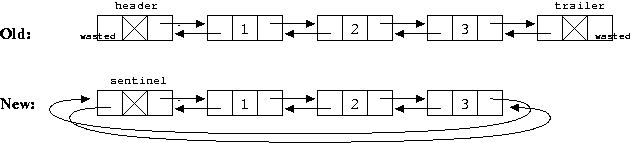
The list should be stored in a "circular" fashion:
sentinel.next points to the first element, and
sentinel.prev points to the last element. The old and
new designs look like this:
From the perspective of a user, your new class should behave exactly like the old one, but internally the implementation is slightly different.
NodeList with extra methodsYou will now add additional methods to concatenate two lists, reverse a list, and iterate over a list in forward, reverse, or sorted order.
The additional methods are described by the FancyList
interface that we have provided to you. You should implement that
interface in a class FancyNodeList that extends
NodeList. So the relationships among the classes and the
interfaces have this rather typical form:
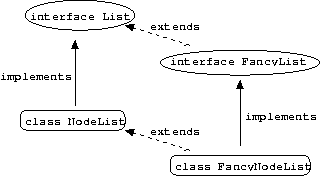
Therefore, your code should have this form:
  public class FancyNodeList extends NodeList implements FancyList {
    ...
  }
|
The append method concatenates two lists. So if
a is the list (1,2,3) and b is the list
(4,5), then a.append(b) is the list
(1,2,3,4,5). Similarly b.append(a)
is (4,5,1,2,3).
The method you will write is actually called
append_destructive, to emphasize that it will change the
lists a and b. In other words,
a.append_destructive(b) will return (1,2,3,4,5), but it
has a destructive side effect: once you have called it,
a no longer refers to (1,2,3) and
b no longer refers to (4,5)! In fact
a and b will not even be valid list
structures anymore; methods called on them will no longer work
properly.
A non-destructive version would leave a and
b alone, and create a new list
(1,2,3,4,5).
Hints:
Before implementing append_destructive, you should
draw at least one example on a piece of paper. Draw two lists
a and b, just as in the figure above showing a
circular list. Then draw what you want a.append_destructive(b) to
look like for your example. This will help you figure out how to
change the prev and next fields correctly.
You may want to write some explicit pseudocode.
Sometimes you may need to save a node's prev or
next in a temporary variable (for your subsequent use)
before you change the field.
Your code to manipulate pointers may get hairy enough that you
are likely to make an error. If this happens, then try to find a way
to make your code simpler and easier to check or think about. For
example, consider writing a private connect method that
helps you hook up two DNodes so that they point to each
other.
Always think about the boundary cases. As you write your code
or pseudocode, consider whether it will work correctly if
a, b or both are empty lists.
append_destructive method should set
a.sentinel and b.sentinel to
null before it returns. Here's why:
According to the FancyList interface's
documentation, the user should not use either a or
b any longer after calling
a.append_destructive(b). If you set their sentinels to
null, then a misguided user who subsequently tries to
call a method on a or b will probably get
slapped in the face by a NullPointerException. (Is this
exception guaranteed to happen? Can you improve the design?)
When you destructively append two lists into one list, your
total number of sentinel nodes drops from 2 to 1. You want Java to be
able to reclaim your unused sentinels via "garbage collection."
Remember that Java can reclaim objects that cannot be reached from any
variables you have. By setting a.sentinel and
b.sentinel to null, you ensure that the
original sentinels can no longer be reached from a and
b.
Notice that the textbook's NodeList.remove does
something similar, for the same reasons. It invalidates the
removed node by setting its prev and next
fields to null.
Note: Since you are modifying a and
b to make them unusable, your return value must be a
different (and usable) FancyNodeList object, created with
new. Its sentinel should point to nodes that
a or b used to point to.
Answer the following in your Readme file:
append_destructive? Use big-Oh notation as usual.
append?
append more efficient? What would its
time and space requirements be?
The reverse method reverses a list. So if
a is (1,2,3) as before, then a.reverse() is
(3,2,1).
Again, you will write a destructive version, so you should actually
call it reverse_destructive to remind the user not to use
a anymore after calling
a.reverse_destructive().
In class we discussed several ways to write such a method, but you
are required to do it by manipulating the prev and
next fields of the DNodes in the list,
including sentinel. That is in order to give you
practice with pointers. Draw your solution before implementing it,
and think about boundary cases!
Answer the following in your Readme file:
reverse_destructive? Use big-Oh notation as usual.
reverse_destructive
differently, by changing the nodes' element fields
(via List.swapElements) while leaving the prev
and next alone. What would the worst-case time and space
requirements have been then?
reverse
method by making a copy of the list in reverse order. (An easy way to
do this is repeated calls to insertBefore.) What
would
the worst-case time and space requirements be?
Before implementing iterator and
iteratorReverse methods of FancyList, you
would be wise to review the Iterator
interface and the tree iterators that we
developed in class. Iterators are also discussed in section
5.2 of the textbook.
These methods of FancyList should return iterator objects.
Specifically, objects of type FancyListIterator and
FancyListReverseIterator, respectively. These are
subclasses of java.util.Iterator that you will write. We
have given you skeletons of these classes. In particular, we suggest
that your iterator have the following instance fields:
  protected Position p;    // position of next element to return, or null if none
  protected FancyList fl;  // have to point to the list too so we can call its methods

  /* Since the list field only holds a pointer to an existing list,
     the iterator only takes O(1) memory, not O(n) as you might think. */
|
iterator and iteratorReverse should be
fairly easy once you understand iterators. (They are also almost
identical to each other.) But be careful about the following:
An iterator should never modify the collection that it
iterates over! (Except for the remove method, which you
don't have to implement.)
The iterator's next method should return an actual
list element (an arbitrary Object). It should not return
a DNode or other Position in the list. (If
you ever want the extra power of positions, don't do it through the
next method. Instead you can give your iterator an extra
nextPosition method, like
this.)
You are required to throw a
java.util.NoSuchElementException if the next
method is called when the iterator is out of elements (i.e., when
hasNext is false).
Be careful that your iterator's constructors and methods do not
throw other exceptions. In particular, you should not throw EmptyContainerException
(from calling List.first or List.last on an empty
list), and you should not throw BoundaryViolationException
(from using List.before or List.after to go past the
end of the list). Those exceptions are not part of the defined
behavior of an iterator, and anyone should be able to use your
iterator without running into them.
So you have two options in writing your iterator. One option is to
use try-catch blocks to catch those
exceptions when they arise and react appropriately. The other option
is to call the List methods only when you are sure the
exceptions won't arise. For example, List.after(p) only
throws an exception if p is the last element of the list;
you can use List.isLast(p) to check whether this is the
case
before you call List.after(p).
The final problem is the hardest and most interesting exercise you have seen so far in this class. Design an iterator that iterates over the list's elements in ascending order. The fact that this is possible demonstrates the flexibility and power of iterators.
The sort should be in the same order (and throw the same ClassCastException)
as Java's built-in sort
method. However, unlike that method, you will not modify that
list, nor will you sort it all at once. Instead your iterator will
be able to return the elements one at a time, in increasing order.
Carefully read the javadoc comment for iteratorSorted,
which explains that you must do a "stable sort":
  /** Returns an iterator over the elements of the list in sorted
   * order.  Elements are compared using the compareTo method
   * and the least one is returned first.  Elements that compare
   * as equal should be returned in their original left-to-right
   * order (this is called a "stable sort").  See the assignment
   * for discussion and hints.
   *
   * @throws ClassCastException if the list contains elements that
   *   cannot be compared to one another (e.g., strings and
   *   integers, or objects that cannot be cast to Comparable).
   */
The method should return an iterator of class
FancyListSortedIterator, which you will design and write.
You should probably store the same two instance fields as in your
previous iterators. What is different is how you advance the Position
p. That is complicated!
Try to figure it out yourself first. If you get stuck, try this hint.
Your iterator should only take O(1) space. But how about time?
Answer the following in your Readme file:
You could output a list in sorted order by calling the
next method until hasNext() is false. In
fact, that is how the test class below will print lists in sorted
order and will create a new sorted version of a list.
FancyListSortedIterator's next method?
next repeatedly?
Remark: The sorting method we have just discussed is called selection sort, because it repeatedly scans the list to select the next biggest element. Many people use this method to sort their cards during a game of poker. One advantage of using an iterator is that the user could quit after getting the 10 smallest elements, which saves time if that's all he or she needs.
Finally, test your FancyNodeList implementation by
running the NumberedString test class that was provided
to you. This test class exercises FancyNodeList through the
FancyList interface.
NumberedString by filling in a couple of methods
(listify and iterFromList).
The NumberedString.main method will create two FancyLists
of integer/string pairs, and will try various methods on them.
For example, running java NumberedString yada yada yada blah
blah yada will start by constructing this FancyList:
  0 / yada
  1 / yada
  2 / yada
  3 / blah
  4 / blah
  5 / yada
as well as the following "standard" example
FancyList:
  0 / hello
  1 / i love you
  2 / hello
  3 / goodbye
The compareTo method on integer/string is
defined so that 0 / hello and 2 / hello are
considered to be equal. This lets you check that your
sortedIterator really does do a stable sort and
preserves their original order. In particular,
iteratorSorted on the standard example above should yield
the order
  3 / goodbye
  0 / hello
  2 / hello
  1 / i love you
which keeps 0 / hello ahead of 2 / hello.
But if you first destructively reverse the standard example, so that
2 / hello precedes 0 / hello, then
iteratorSorted should preserve that order too, yielding
  3 / goodbye
  2 / hello
  0 / hello
  1 / i love you
Here is the correct result of a sample run. You may want to check that you get the same answer.
$ java NumberedString yada yada yada blah blah yada --- example --- 0 / hello 1 / i love you 2 / hello 3 / goodbye --- example [in reverse order] --- 3 / goodbye 2 / hello 1 / i love you 0 / hello --- example [in sorted order] --- 3 / goodbye 0 / hello 2 / hello 1 / i love you ============================================================ --- sort(example) --- 3 / goodbye 0 / hello 2 / hello 1 / i love you --- sort(example) [in reverse order] --- 1 / i love you 2 / hello 0 / hello 3 / goodbye --- sort(example) [in sorted order] --- 3 / goodbye 0 / hello 2 / hello 1 / i love you ============================================================ --- args --- 0 / yada 1 / yada 2 / yada 3 / blah 4 / blah 5 / yada --- args [in reverse order] --- 5 / yada 4 / blah 3 / blah 2 / yada 1 / yada 0 / yada --- args [in sorted order] --- 3 / blah 4 / blah 0 / yada 1 / yada 2 / yada 5 / yada ============================================================ --- reverse(args) --- 5 / yada 4 / blah 3 / blah 2 / yada 1 / yada 0 / yada --- reverse(args) [in reverse order] --- 0 / yada 1 / yada 2 / yada 3 / blah 4 / blah 5 / yada --- reverse(args) [in sorted order] --- 4 / blah 3 / blah 5 / yada 2 / yada 1 / yada 0 / yada ============================================================ --- reverse(args) + example + args --- 5 / yada 4 / blah 3 / blah 2 / yada 1 / yada 0 / yada 0 / hello 1 / i love you 2 / hello 3 / goodbye 0 / yada 1 / yada 2 / yada 3 / blah 4 / blah 5 / yada --- reverse(args) + example + args [in reverse order] --- 5 / yada 4 / blah 3 / blah 2 / yada 1 / yada 0 / yada 3 / goodbye 2 / hello 1 / i love you 0 / hello 0 / yada 1 / yada 2 / yada 3 / blah 4 / blah 5 / yada --- reverse(args) + example + args [in sorted order] --- 4 / blah 3 / blah 3 / blah 4 / blah 3 / goodbye 0 / hello 2 / hello 1 / i love you 5 / yada 2 / yada 1 / yada 0 / yada 0 / yada 1 / yada 2 / yada 5 / yada ============================================================ |
Note that the NumberedString test class only tests the
methods specific to FancyList. It does not
necessarily use all of your basic NodeList methods. You
are responsible for figuring out how to test those yourself and
finding any bugs before the graders do!
The niftiness of iterators is illustrated by the
NumberedString.printIter and
NumberedString.listFromIter methods, which can take any
kind of iterator as an argument. Because of dynamic method lookup, they
don't have to know what the particular iterator's next
method does -- they can just call that method.
Giving an iterator to a method such as printIter is
very much like giving it a singly-linked list of elements. However,
an iterator is a "virtual" list that takes only O(1) space. Its
next method will simply construct and return successive
elements as needed, without storing them all in memory. This is most
dramatic in the case of your iteratorSorted, where there
is never an explicit sorted list in memory. As another example, you
could easily write an iterator to return the sequence of numbers 1, 3,
5, 7, ... and so on forever. printIter would happily
keep printing those numbers until you turned off the computer, just as
if it were traversing an infinitely long list, but of course no such list
has been built in the computer's memory.
For extra credit, implement and test the remove method
for each iterator. (That is, actually remove something rather than
throwing an UnsupportedOperationException.) Note that
remove is a standard part of Java's Iterator
interface; read the documentation
for how it is supposed to work.
This is not a hard problem, since you already have a
List.remove method. But make sure your implementations
work exactly as the interface requires! Calling remove
should not affect the sequence of elements that the
next method will return in future. It should only remove
the element that was just returned (throwing
IllegalStateException if there's no such element or it
was previously removed).
Here is a different extra credit problem. You may do either or both problems if you like.
Write a class MergedIterator that implements Iterator.
The constructor MergedIterator(Iterator iter1, Iterator
iter2) should produce an iterator that returns all the
elements of both iter1 and iter2. If
iter1 and iter2 both produce elements in
sorted order, then the merged iterator should iterate through all
the elements of both in sorted order.
To accomplish this, the merged iterator's next()
method should return the next element of either iter1 or
iter2, whichever is smaller according to
compareTo. Ties should be broken in favor of
iter1.
To test your class, add the following code to the end of
NumberedString.main. Note that this code does not use
any destructive operations. Instead of destructively appending two
lists and creating a sorted iterator over the result, it creates
a sorted iterator over each list and then merges them.
System.out.println("*** Non-destructive merge of two sorted lists ***");
fl = listify(args);   // back to the original list
printIter("args", fl.iterator());
printIter("example", example.iterator());
printIter("args [in sorted order]", fl.iteratorSorted());
printIter("example [in sorted order]", example.iteratorSorted());
printIter("args + example [in sorted order]",
          MergedIterator(fl.iteratorSorted(), example.iteratorSorted()));
|
Jason Eisner - jason@cs.jhu.edu - $Date: 2004/02/18 07:20:18 $